Alexander Yang
Content Operations App
Designing and building an internal tool that automated Center Centre's email production, supporting 5M sends/month.
Web developer + email production
Web Developer, Center Centre, 2025
In 2025, I was a web developer at Center Centre, where I was in charge of Center Centre’s emails.
Emails are their primary form of communication: a critical part of running courses, events, and marketing. The timeliness and accuracy of these emails was essential for event turnouts, campaign effectiveness, and—over time—built trust with our students and clients.
In part due to their importance, I inherited an email production process that had evolved out of urgency.
An average weekly calendar, with both course ops and marketing campaign emails. On top of the pictured volume, some entries represent multiple variations or last-minute additions.
With the workflow I was trained to use, it took 1-2 hours to create, review, and schedule each email. It was a slow, manual process with a lot of room for error.
At a rate of 15-25 emails per week, emails took up an entire full-time workload. When we didn't have multiple developers, progress was exceedingly slow on other priorities, like new product launches, web dev projects, and even some maintenance.
Developers felt like they were treading water. Even though the process clearly needed rethinking, there wasn't enough time to make all but surface-level changes.
I was able to optimize my personal workflow to the point where I had some extra bandwidth outside of emails, and I decided to put my extra time towards process improvement.
Can We Just Use React Email?
The team was supportive when I floated the idea of streamlining production. They reasonably qualified, though, that they would need to feel just as comfortable with its reliability, inspectability, and inheritability.
The co-founder agreed that most of the emails were just variations on the same structure; he proposed an aspirational vision: have these systematic emails scheduled out at just the 'push of a button'.
They had built up years of trust in the production and extensive QA review system, so change that would fit neatly into the existing architecture would be much easier to get buy-in on than a complete overhaul.
I decided to pursue a series of constrained interventions, especially backwards-compatible automation, to incrementally overhaul the system in a way that stays both trustworthy and coherent to everyone.
This case study will tour the initial production process and then the final overhauled workflow, demonstrating how targeted tooling can completely transform brittle operational pipelines from the inside out.
The Aforementioned, Brittle Pipeline
I’ll walk through the original lifecycle of an email, in order to illustrate the time sinks and risks that necessitated this project, as well as to establish the structure that my inside-out redesign would need to fit into.
Time estimates are included and totaled for each step, based on mine and two other developers' experience at our fastest. Inactive delays, ie. waiting for a QA review, are shown in blue.
Step 0. Creating the Schedule
Center Centre sends out emails for a variety of operational needs, which can be divided into two categories: regular and irregular.
Most emails were regular: routine notifications for participants in a course or event (Today’s Session with the day’s topic and zoom link, Next Week’s Schedule with times and homework, or Session Recording after a webinar).
Occasionally, we would have one-off irregular emails for our marketing lists (promotions, free resources, or news). Irregular emails would be added to our shared Notion calendar by other teams.
An average weekly calendar, with both course ops and marketing campaign emails. On top of the pictured volume, some entries represent multiple variations or last-minute additions.
Regular emails, though, were scheduled ahead-of-time, based on course/event calendars. Each week, the dev would cross-reference calendars with documentation that specified what type of email to send and when.
The scheduling was quick to do once a week, but it introduced a silent risk of failure—miss one entry and a paying cohort or thousands of subscribers wouldn’t receive critical information. Around once a month, someone would catch an email missing or misclassified in the schedule.
On the top, a calendar spreadsheet with all sessions and their details. On the bottom, a document that specifies which emails each session needs, based on its type and timing. Manually cross-referencing the two created the email schedule.
Step 1. Filling in the Content
The first step for an individual email was to put together a Google Doc with the content and scheduling information. Depending on how ahead the developer was, we'd start this a day or two before it would go out.
For one-off irregular emails, a pre-reviewed document with content was provided by the requesting team.
For regular emails, use a pre-existing document as a template. The copy and structure of these regular emails stays the same, just with dynamic dates, links, and topics.
Paste in and format the snippets, using a designated source of truth for each type of information: a spreadsheet for dates and times, forum pages for links, and syllabuses for topics.
As a high-volume manual process, mistakes were unavoidable. At least once a week, a developer would miss or incorrectly fill a snippet.
A partially-completed content doc for a regular course email, with metadata and text content in markdown. The placeholders are highlighted to be manually populated by the developer.
Complete a QA checklist to double-check accuracy of all inserted details.
Send a QA ticket for another person to do the same. In most cases, any remaining content inaccuracies were caught here.
2. Copying Content into A Design
Once the document is reviewed, copy the content into an HTML email design with Stripo.
In Stripo, a visual editor for HTML emails, we had one copy of each email design in limited storage space. Most email types share designs, though, so the text components normally needed to be redone from scratch.
Inserting text was especially tedious with Stripo. Text needed to be stripped of formatting and pasted in line-by-line, otherwise the editor would, without fail, visibly corrupt the HTML.
The editor would also continuously revert designs to default styling, making links bright green, recursively adding margins, and breaking indentation.
Multiple times a week, formatting issues or style corruptions would be introduced in this stage. At least once a week, content mistakes would be introduced.
A Stripo email design in the editor. The content is being manually copied and pasted from a Google Doc, then styled/re-styled with the editor’s formatting options.
Irregular one-off emails were usually either included custom design elements, or had many pages of copy that needed to be copied over.
Complete a QA checklist to make sure each sentence, link, and date was correctly copied from content document, and then that the styling and design matches convention.
The content document is used as the source of truth, though, which means anything missed in the first QA review will no longer be caught.
Send a QA ticket for another person to do the checklist. In most cases, unnoticed issues with styling or content was be caught here.
3. High-Stakes Delivery Configuration
After the Stripo design is reviewed, export it to ActiveCampaign, our marketing and CMS platform, and to be configured for delivery.
Legally, there are two types of emails: marketing and transactional.
Marketing emails have strict regulations, like mandatory unsubscribe links, and are subject to much more scrutiny by email providers and spam filters.
Transactional emails are treated as priority and are afforded less scrutiny. An email counts as transactional if it is a necessary part of a user-initiated interaction, like confirmations or password resets.
To ensure email providers distinguish the two, they need to be sent with different service providers. ActiveCampaign provides native marketing email delivery, and also has integrations with a transactional-only email service Postmark.
For marketing campaign or event emails, configure an ActiveCampaign 'campaign', which sends a synchronous blast of marketing emails to a list of contacts.
The campaign creation page in ActiveCampaign. The Stripo design is imported, then the audience and scheduling are configured manually, based on the content document's header.
For course-related transactional emails, use the Postmark integration inside of an ActiveCampaign automation.
ActiveCampaign’s automations are step-by-step funnels, similar to Zapier, that do sequential actions on specific contacts.
Our paid programs require scheduled notifications and resources, but Postmark doesn’t natively support pre-scheduled emails. It may do so to encourage compliance, but our use case is within the bounds of a limited user-initiated transaction, so we needed to find a workaround.
By adding ‘wait’ conditions in between Postmark email send actions, we could create course-long sequences that deliver emails at a predetermined time and date.
One portion of automation setup in ActiveCampaign. The email scheduling configuration is similar to campaigns, but with additional setup steps and a slower interface.
ActiveCampaign’s interface was generally slow to use, often taking 30+ seconds to load a page. The automation editor was especially slow, because each field in a form would only begin to load options when individually selected.
Manual entry of the critical details, like recipients and date, led to consequential mistakes at least once a month. Even small mistakes in input could prompt an immediate send.
One-off emails always had multiple versions, corresponding to different marketing lists. Each version needed to be exported and configured separately.
After configuring the email in a campaign or automation, send out a test email.
The final QA checklist compares the content and design of the test to the Stripo design, then verifies the scheduling settings.
Have two additional people complete the final checklist.
Mistakes introduced in ActiveCampaign were usually caught here, but earlier issues and more abstract problems, like it being the wrong type of email, were not.
Total Time Tally
Regular emails
30min content + 40min design + 35min scheduling = 1hr 45min
(plus 1hr 50min of review time = 3hr 35min turnaround)
Regular emails are done in parallel, so that inactive time for one email is spend on another. The active work per email, though, is still a unfortunate 1-2 hours of repetitive, manual work.
Irregular emails
55min design + 40min scheduling = 1hr 35min
(plus 1hr of review time = 2hr 35min turnaround)
Irregular emails are faster to produce because they are always provided last minute, and so inactive wait time is minimized. They have different needs, but at 1-2 hours of active work, their process is just as in need of improvement.
It Gives Me a Headache to Imagine Doing That 5 Times a Day
If emails were an occasional need, this process would be fine. Using this process to get 25 mistake-free emails per week, though, is an overwhelming task.
Neither the developers nor the reviewers were excited about that amount of bandwidth going towards slow, repetitive work. Center Centre wasn’t able to get out timely messages, experiment with emails, or make all but slow progress on websites.
The manual process achieved a lot of ceremonial QA—continuously reviewing unfinished artifacts—but it was not efficient, scalable, or even particularly reliable.
Two instances of the same type of email. The changes in content are small and systematic.
The repetitive nature of the work was demoralizing. All the developers I spoke to agreed: it felt like a task that a machine should be doing, but the tools and organization weren't set up to support that.
The course and event emails were essentially just programmatic templates being operated by hand. Even the one-off marketing emails seemed automate-able: the bulk of the work was just converting markdown into HTML.
The Birth of a Wizard
After my discussions with the team, I went step-by-step through the process. For each stage, I identified opportunities for automation that would keep the overall process and role of the developer intact.
As a home for these semi-automated tools, I built a web application that could interact with our data sources, connect the steps together, and integrate with our existing platforms.
Page 1. The Schedule
We already maintained a comprehensive database with a complete calendar of courses and events, necessitated by our websites.
If a tool knew which emails to send for each type of session, it could resolve a comprehensive email schedule based on the calendar data.
A view of the calendar database for the 'UX Metrics' course. The database included all the information necessary to schedule emails, and much of what was needed to populate them.
Which emails to send for each type of session was the key piece of logic that I needed to formalize. The first session of a course, for example, would need a different set of emails than the subsequent sessions. A webinar would need different emails than a workshop.
I created a configuration file to store the conditions that necessitate each type of email. Ex: If Course: Research, schedule a Today’s Session email at 8am on the same day. Each session in the calendar could be ran down the ‘filter’ tree to collect a complete list of applicable emails.
The schedule configuration format, which specifies emails based on filter conditions for each session. Put a pin in the "{Session Date}" part
Compared to hard-coding the scheduling logic, this format enabled long-term change—new courses or new types of emails—to be made quickly, flexibly, and within a guardrailed environment.
I integrated the database and schedule logic into a page of the app, and created an interface to view, search, and filter the agenda.
The schedule page, generating a live email schedule based on the calendar. Each entry is linked to the progress made in other steps. One-off emails can be added manually, and will also appear in the schedule. Entries have buttons that sync to the Notion calendar and create participant notes in Google Docs.
For the first time, Center Centre's email needs could be visualized months in advance. It completely eliminated scheduling errors during mine and my successors tenure.
Page 2. Filling Templates
We have selected an email and have all the relevant dates, topic, links, etc. We just need to plug it into an email design. The most straightforward way to do that would be to use a JS rendering solution, like a React-based email framework.
With a drastic break from procedure like that, however, the team would not be able to build trust, collaborate, or train fellows the same. When populating designs inside the Stripo visual editor, the entire process is accessible and traceable for everyone.
I wanted an approach that could plug dynamic data into our Stripo-made HTML designs, preserving both accessible editing and our review culture.
A Custom Variable System
Email providers already have a way to plug dynamic content into designs, it looks like %FIRSTNAME% or %COMPANY_ADDRESS%. Our templates, though, would need to make complex requests:
- Different formats and timezones of the same datetime value
- The segments of strings (example: 'April 2025' cohort -> 'April' in copy)
- Information about other sessions (example: a link to last week’s recording)
- Dynamically iterated content (example: a list item for each upcoming event)
After surveying placeholder/variable solutions, I decided to create a custom system that could address our unique requirements without compromise.
I designed a O(n) parser to replace any curly braced {Variable} with a corresponding text value, and built in guardrails for missing or bad data.
After experimentation, I also added robust, O(n) support for unlimited recursion in both variables and values. This is a feature other string-placeholder systems do not bother tackling, and it is remarkably powerful.
With recursion, strings could use compound variables like {{Topic} Title} to lookup values based on other values. ie. {{Topic} Title} -> {Topic 4 Title} -> "How to Measure UX Goals".
Infilled values can also contain more values, so that {Footer} can reference a template-ized footer, ex. You're receiving this from {Program Name} <br/>{Unsubscribe Link}
By typing these plaintext variables directly into Stripo designs, detailed emails could turn into dynamic data-driven templates without any change to the editor or workflow.
A variable-ized template for a course's first weekly email. Dynamic snippets are rewritten in-place as variables, to be filled by the tool. Link href's are also variables, but aren't visible.
With the foundation of the variable system established, I designed two specialized features to support the specific needs of our emails.
To lookup values from other sessions, variable names can be prefixed with a Week # Session #. For example, {Week 1 Session 2 Topic} would pull the topic of the 1st week's 2nd session.
To support date formatting, timezones, and other in-place modifications, I designated parenthesis-wrapped phrases as pre-defined transformations on the value. For example, {Session Date (GMT)(HH:mm A z)} would convert the sessions' datetime value to GMT time, then insert it as a "10:30 AM GMT"-style formatted string, without modifying the original value.
A template for a course email that explains the agenda for the week's two sessions. Links are green because a hidden variable in the CSS will set the color on population.
In the template above, the Lecture Date value is prefixed to lookup both of a week's sessions, then formatted with transformations:
{{Week} Session #2 Lecture Date (dddd, MMMM Do [at] h:mma z)(:00)}
{Week #3 Session #2 Lecture Date (dddd, MMMM Do [at] h:mma z)(:00)}
= 2026-02-18T18:00:00Z - (dddd, MMMM Do [at] h:mma z)(:00)
= "Wednesday, February 18th at 6:00PM EST" - (:00)
= "Wednesday, February 18th at 6PM EST"
Even the one-off marketing emails, where an entire unique body was given, could be templated: the content could be pasted into a {Body} variable, and a (MD to HTML) transformation could parse the markdown.
Between the interoperable features and recursion, I had essentially created a lightweight, highly-targeted scripting environment.
The list of available transformations. New transformations were added as needed, and were implemented in a modular, order-opinionated waterfall system that safely bridged inter-type transformations.
Instances of the same email could be found between courses, only having different banners, colors, and titles. These course-scoped values, though, couldn’t be found in the session-scoped calendar data.
While creating templates, I realized that if there was a way to resolve additional, conditional values, there would be no need to make a separate set of templates for every program.
I repurposed the schedule configuration format to provide these 'settings' to each course, session, and email. Not only could reusable templates use this for course zoom links, colors, etc., but snippets like {Footer} could be easily defined and conditionally overridden here.
Excerpt of the email value config, specifying settings for the program named 'AI'. At the top, program-wide values are declared. Below that, a program-specific email type 'Lightning Talk' is given metadata. At the bottom, universal email types like 'Email Type:Message' have their settings imported and destructured from a shared file.
The simple, flexible format was also the perfect place to specify the critical technical details for each email type in the schedule, like the file path of the HTML template, marketing or transactional categorization, and metadata.
The Final Template Interface
After selecting an email from the schedule, the second page of the app compiles all relevant values (from the calendar, then the settings config), and provides an interface to review the data for accuracy.
After the developer confirms the compiled values, the third page displays the populated HTML template, alongside a dynamic form with all the in-use values.
A walkthrough of the template population interface.
Most of the templates were fully populated with calendar data and conditional values, requiring no manual input. For these, all the developer needed to do was select an email and review the results for accuracy.
A few templates required manual input, like the one-off marketing emails, and these only took a few minutes to fill in. The purpose-made transformations automatically handled the common formatting issues and allowed manually-input HTML for custom components.
The variable-population system had achieved the 'press a button' vision, and was vastly more reliable than manual entry.
Not only did content issues become rare, but also became difficult to miss. The tool automatically flagged missing or malformed data, and any remaining issues (like corrupt CSS or missing sections) were obvious compared to subtle mistakes in the manual process.
The design of templates was the only significant entry point for human error. To ensure templates were reliable and accurate, I designed a strict QA review process for new templates. After this stage of comprehensive testing, templates were promoted to a less repetitive QA regimen, much to the benefit of reviewers and at no cost to reliability.
Page 3. Publishing
We now have a ready-to-send HTML design. All that’s left is uploading to ActiveCampaign and configuration.
The platform, though, doesn’t have documented API methods for email-related features. Uploading and configuring manually was not only time-consuming, but also a common source of critical errors.
To overcome the limited API functionality, I studied the inner workings of ActiveCamapaign's web application and built a client-emulation layer that could import HTML designs, set up campaigns, and/or undo any of its actions.
I encoded the functionality into modular automations, assembled into different sequences depending on the type of email.
The publishing page for a transactional course-related email, waiting for final QA approval in Slack after export and configuration was completed.
With these high-level automations, the developer could publish, test, and coordinate reviews of an email with just a few clicks. Each module had pre- and post- flight checks, rollback functionality, and a manual fallback.
For ActiveCampaign's automation editor, where emulating the client wasn’t feasible, a fallback helper provides copy-able versions of each field. Even just this fallback drastically improved data entry time and accuracy.
A demonstration of the manual form-fill helper, shown when emails needed to be added to an ActiveCampaign automation. It provides copy-able versions of each field, with the exact formatting accepted, to speed up manual entry and reduce errors.
Beyond ActiveCampaign, I designed integrations all other administrative tasks: back-linking the Notion entry, creating participant notes in Google Docs, and submitting/tracking the QA tickets in Slack.
Instead of high-stakes data input, the publishing stage only required triggering the integrations and inspecting the results.
With the transfer of content from sources of truth to the final design managed by the tool, QA could focus on validating accuracy and design. Collaboration could still happen in automatically-generated content docs and the Stripo editor, but without the need to review these intermediate artifacts.
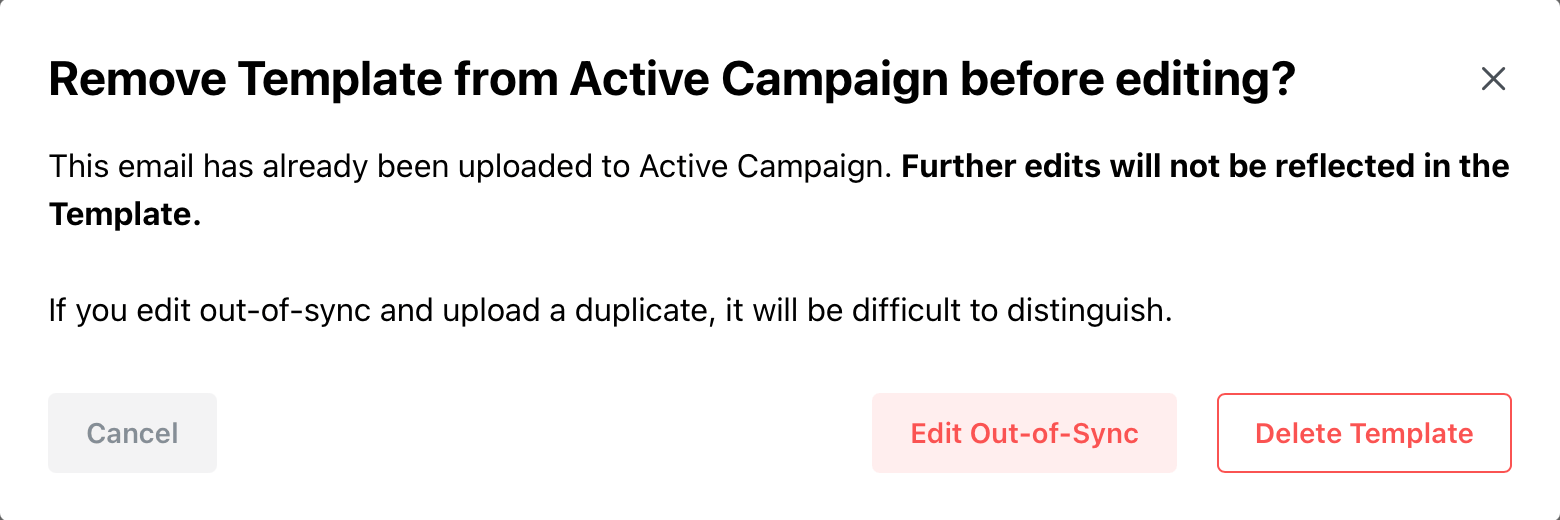
A warning system to prevent local & exported versions from conflicting.
Features of the publishing process: undo, smart links, and polling.
Dynamically-generated template form.
Built-in HTML editor for one-time adjustments to template styles or layout.
In-progress emails in sidebar.
Quick-access card for manual fallbacks during publishing.
Email-session entry in schedule, with calendar and participant notes integration.
The Impact
The email application quickly became the biggest and most impactful piece of software I had worked on. The scale of the benefits was apparent to both the developers and the entire team.
a. Hours Saved (so Far)
0-30min Content + 40-55min Design + 35-40min Scheduling = 1hr 40min
(+1-2 hours of review time = 2.5-3.5hr average turnaround)
10min Content/Design + 15min Scheduling = 25min
(+35m of review time = 45-90min turnaround)
1hr 40m - 25m = 1hr 15min (75%) avg. of active work saved per email
Any email could be created and scheduled in only 15-30 minutes, and the only manual work was a single QA review and occasional form input.
Far from the hour-minimum of repetitive, unconstrained text manipulation, the process was quick and guided enough to be done in large batches or on a whim, without filling the day.
Urgent email requests were a clear indicator. For emails handed off to be sent ASAP, the effect of the tool could be measured, isolated from parallel work.
This was the first thing the team noticed, these urgent emails were being handed back in a fraction of the time.
For the first time, these urgent communications had a reliable timeline. The quick turnover also gave the team significantly more wiggle room to iterate, experiment, and collaborate on email design and content.
With the tool, we built a new community onboarding flow—engaging new users with our free and paid resources—and we universally integrated a topic-based selective unsubscribe system—a feature that was in the backlog for years.
A bundled-course product, launched with a brand-new data driven website and navigation design.
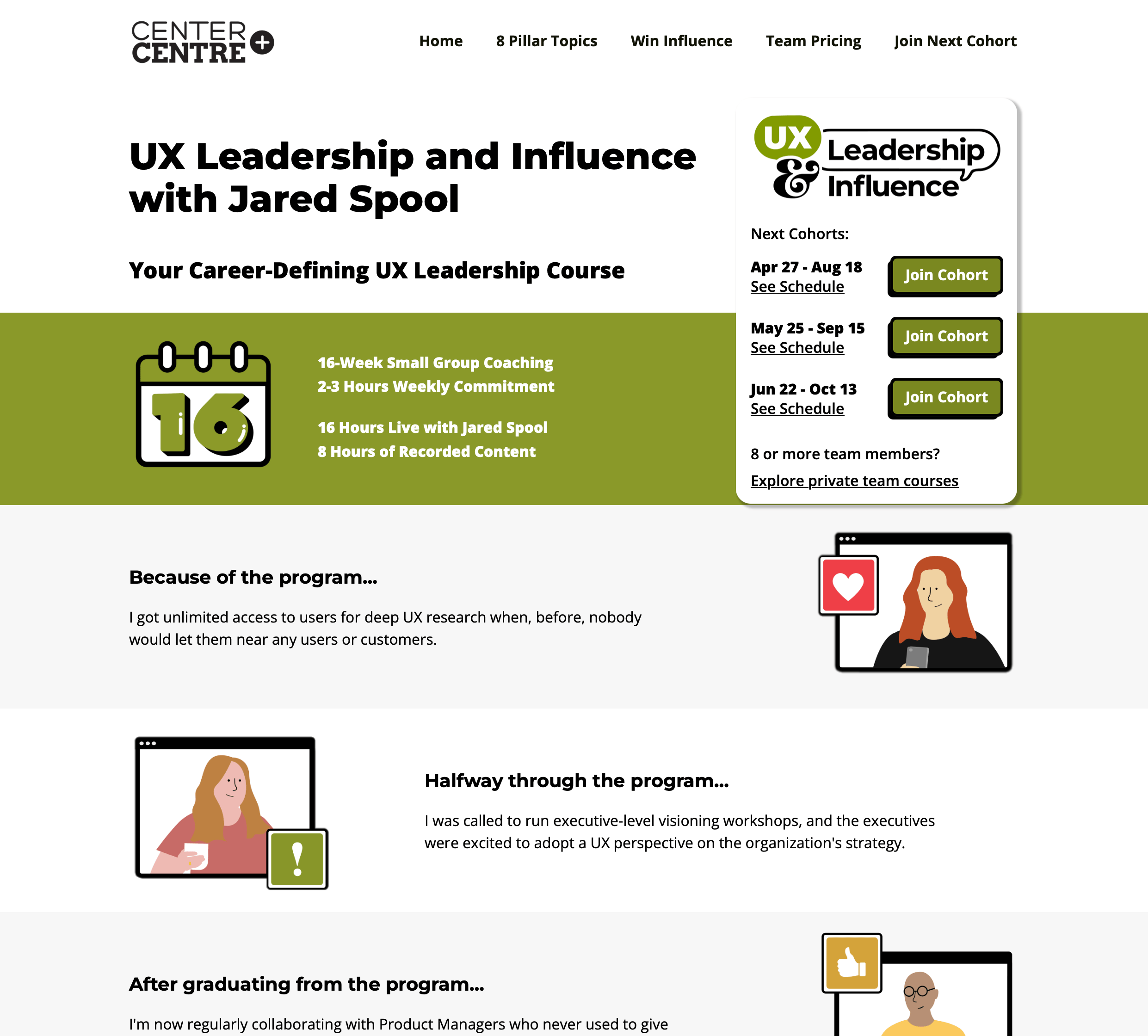
A re-designed landing page with new branding for our flagship 16-week leadership course.
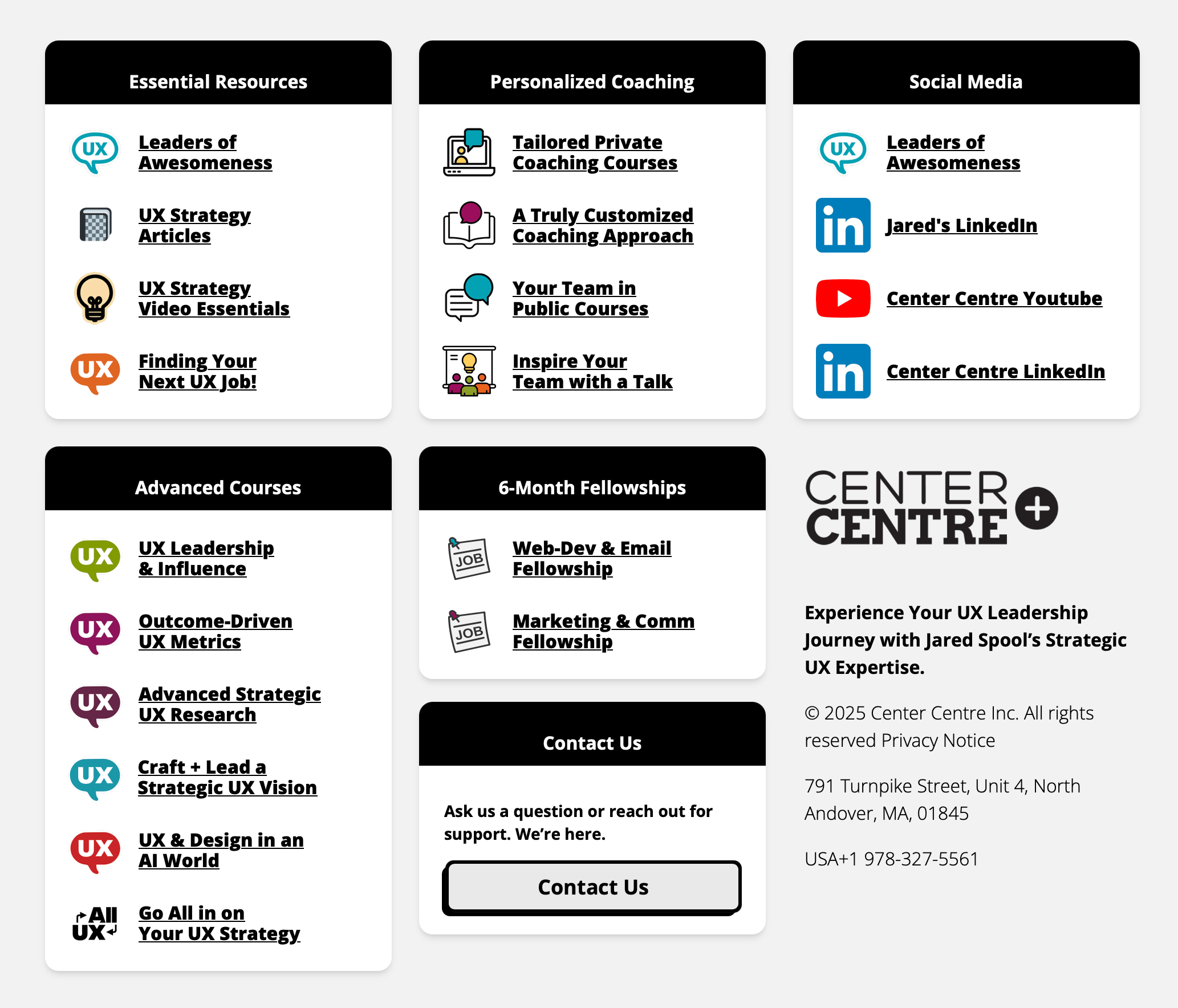
An new universal footer, providing a newly succinct map of Center Centre programs.
Call to actions on a new website that explores corporate-oriented services in detail, a key profit driver.
The relief from repetitive work gave both developers and reviewers more time and energy throughout the day.
The email-designated developer was, for the first time, able to reliably expand their focus beyond emails. For the rest of mine and my successors time, product and website launch timelines were halved and the backlog of maintenance, migration, and redesign projects rapidly shrunk.
We completed three major product launches, five website redesigns, and a variety of smaller web projects, where many fellowships only had time for one completed project and partial progress on another.
On the reviewer side, QA reviews were easier to complete for a variety of reasons.
After demonstrating the reliability of the automated intermediate stages, the team became comfortable merging the front-loaded accuracy checks into the latter 'transfer-checking' QA. The review workload was cut in half, without a single reduction in the meaningful, ie. accuracy-testing, checks.
Faster production also meant that reviews could be provided in intuitive batches, allowing us to knock out an entire course's emails in one go, and review each easily in the context of the others.
b. Mistakes Prevented ( in production)
The tool-assisted workflow eliminated the majority of entry points for human error. It created a minimized-risk journey of important information from source to students, contacts, and clients.
There was a significant reduction in errors, overall and in critical areas, like inaccurate content or visible design issues. The rate that serious issues were flagged in QA went from 2-5 times a day to only 1-2 times a week.
Manual, human mistakes were more difficult to catch in review: repeated words, typos, missing sentences, or links to incorrect pages.
Mistakes made inside the tool were easier to catch, not only because of safety features but also because they tended away from tricky nuance. Between volume and noticeability, significant errors reaching production was less common.
c. Speaking a Familiar Language
I kept the team involved with discussions and demonstrations as I created tools stage-by-stage. By the time a complete workflow was ready, everyone was familiar with the tools, had a role in their design, and understood each one's place in the existing process.
A key part of my pitch, the team could continue collaborating and overseeing in the same capacity: copywriting in Google Docs, designing in Stripo, managing contacts in ActiveCampaign, and reviewing any/all of the same artifacts as before.
The tool only shifted how these pieces—content document, Stripo design, ActiveCampaign config—were integrated on the developer's side.
The moving parts and key concepts of the assisted workflow were either the same or derived from the manual one, meaning new fellows could be efficiently trained on both.
The team made it clear: the manual process was a mandatory part of training and a familiar fallback. The tool's parity allowed me to position it as a quick, optional follow-up. Compared to a react-email level overhaul, which would be mutually-exclusive training time, the barrier to sustainable adoption was much lower.
Indeed, the tool has been handed off to the two subsequent developers, who learned the manual process before transitioning to the tool, and subsequently maintained, configured, and used it at scale.
d. Conclusion
Partway through, I understood why no one had built a tool like this before me. The problem seemed tailor-made for a software solution, but the culture of the team, rightly, set a high bar for would-be interventions.
An adoptable solution for this team needed to preserve the channels of coordination, provide inspectability to everyone, and embody both technical and social maintainability.
Respecting these constraints created a unique engineering challenge: formalizing tacit knowledge, integrating disjointed platforms, and automating discreet mechanisms.
The result was not only faster email production, but a more reliable and sustainable operational pipeline—one that afforded the team capacity toward launches, redesigns, and other product work.
The most important validation of the project is that it outlived its initial implementation. Subsequent fellows were able to learn, maintain, and extend the system because it was designed around organizational continuity, adding extra bandwidth, long-term.